

Are you always searching through your wallet, trying to find that one rewards card you need? Well, imagine a world where you don’t have to worry about lost or forgotten rewards cards anymore. That world is here with Apple Wallet. By adding your rewards cards to Apple Wallet, you can easily access them whenever you need them and even receive notifications about special deals and offers. In this blog, we will cover how to add your rewards cards to Apple Wallet and view them, as well as enable wallet sync in iCloud settings. We’ll also share how third-party apps can help streamline the process. Lastly, we’ve got an expert Q&A session where we discuss the future of digital rewards with Apple Wallet. Get ready for a new level of convenience in your shopping experience!
Adding Your Rewards Cards toYour Customers’ Apple Wallet:
Offering a simple way for users to access rewards cards on the go, the wallet app makes it easy and convenient for customers to stay connected with your brand. By providing an option for users to add their rewards cards directly into their Apple Wallet through the use of QR codes or barcodes, you can increase engagement and encourage repeat business without relying solely on traditional methods like email or in-app notifications. With support across all Apple products including iPhone, iPad, Mac, and Apple Watch, integrating with Apple Wallet is a good idea no matter what type of card you offer—whether it’s a credit card, loyalty card, gift card or membership card.
How to Apply a Pass Template to your Rewards Card
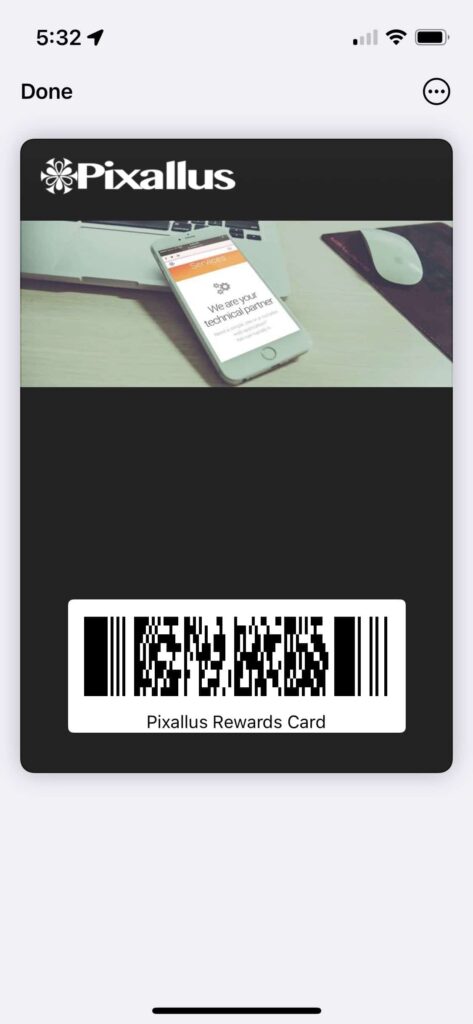
Make it easy for your customers to access their digital rewards with Apple Wallet by applying a pass template to your rewards card. This simple functionality offers customization options like adding logos, barcodes, and expiration dates. With everything organized in one place within the wallet app, customers can easily scan their rewards card from their iPhone or iPad at checkout using touch ID or face ID. Integrating with Apple Wallet is an easy way to increase customer loyalty and engagement while also providing valuable data and insights for businesses. Don’t miss out on the convenience and functionality of Apple Wallet for your digital rewards and loyalty cards.
Scanning the Barcode of your Rewards Card
Customers can easily scan the barcode of their rewards card using their iPhone’s camera, after adding their rewards card to Apple Wallet. This allows them to conveniently keep track of their reward points and expiration dates within the app, which eliminates the need for a physical card. The process is much more efficient compared to traditional methods, as customers can access their rewards while on-the-go. By using Apple Wallet for digital rewards, businesses can save on costs associated with creating physical cards, while also offering an eco-friendly solution. Additionally, customers can enjoy added security features such as Touch ID and Face ID when accessing their rewards using Apple products.
Entering the Barcode of your Rewards Card
Adding rewards cards to your customers’ wallet app is an easy way to increase engagement and loyalty. One of the simplest ways to add a rewards card is by scanning the barcode using your iPhone’s camera or entering the barcode manually. By doing so, customers can easily keep track of their reward points and expiration dates, and receive notifications about new promotions directly within the app. Additionally, pass templates offer a range of customization options such as adding logos, barcodes, expiration dates, making it easy for you to design custom loyalty cards that fit your brand. Overall, using digital wallets like Apple Wallet is a good idea as it not only saves costs on physical cards but also reduces waste while offering enhanced functionality and security for both businesses and customers alike.
Getting the Barcode from a Photo of your Rewards Card
An easy way to improve customer convenience and satisfaction is by adding their rewards cards to their digital wallet app. To do this in Apple Wallet, one can simply scan a photo of the card’s barcode with the “Scan Code” feature or through third-party apps such as Stocard. It’s important to ensure that the barcode is clear and readable before adding it, as this will enable customers to easily access their rewards without having to carry a physical card. With Apple Wallet supporting loyalty cards, membership cards, boarding passes, coupons, gift cards, and certificates, it’s a good idea for businesses to include an “Add to Apple Wallet” button within their emails or webpage promotions. Additionally, features such as Touch ID, Face ID, passcodes, and notifications keep customers’ information secure while still providing ease of use.
Viewing your Rewards Cards in Apple Wallet
Storing loyalty and reward cards has never been easier thanks to Apple Wallet. The wallet app allows users to keep all types of cards in one place, from membership cards to gift certificates. You can add your rewards cards by simply scanning a physical card, or by entering the card information manually. Moreover, Apple Wallet supports various types of templates for creating different types of digital passes like coupons, boarding passes with QR code, etc., which can be accessed by all Apple products like iPhone, iPad, Mac and even Apple Watch and TV. Thus, using Apple Wallet provides an easy way to manage all of your reward programs from one central location without having to carry a physical wallet full of credit and debit cards.There are multiple features supported in apple wallet such as touch id , face id , passcode , etc thus securing privacy policy . Additionally ,Users can receive notifications about new promotions and offers directly within Apple Wallet making it even more user friendly.’
Enabling Wallet Sync in iCloud Settings
By enabling Wallet Sync in iCloud Settings, you can conveniently store all of your digital rewards and loyalty cards for easy access. With this feature, your wallet app will sync across all of your Apple devices seamlessly. You won’t have to worry about manually adding the same rewards cards to different devices anymore. Plus, if you ever lose or replace a device, all of your reward cards will still be safe. Enabling Wallet Sync is a good idea if you’re looking for a hassle-free way to manage all of your digital rewards.
Adding Cards to Apple Wallet from Email or Webpage
Integrating digital rewards with Apple Wallet is simple and convenient. To add your rewards cards to the wallet app on iPhone or iPad, you have several options available. You can apply a pass template to make it more visually appealing or use the camera feature within the app to scan the barcode on the physical card. Alternatively, you can manually enter the barcode information or even capture the barcode from an existing photograph of the physical card. Adding cards from email or a webpage is equally easy with just a few taps in-app. Make sure your emails and website are optimized for this functionality by incorporating an ‘Add to Apple Wallet’ button for quick access. Encourage customers to store their digital membership and loyalty cards in their wallets for ease of use across all Apple products.
Adding Cards to Apple Wallet using Third-Party Apps
Adding and managing cards in Apple Wallet is made easier with third-party apps. These types of apps help streamline the process of adding various types of cards such as loyalty cards, coupons, and membership cards to Apple Wallet. In turn, users can easily access their digital rewards without having to carry physical copies. This easy way to manage digital rewards is a great idea that supports Apple Wallet’s functionality across all devices including iPhone, iPad, Mac, Apple Watch and Apple TV. Additionally, many third-party apps support features such as Touch ID or Face ID passcode or password security for enhanced privacy protection.
Expert Q&A on Digital Rewards with Apple Wallet
Apple Wallet is revolutionizing the way people store their Rewards Cards and Coupons. It brings an easy way to keep track of your loyalty points and discounts by just adding them all in one single digital wallet app. In this Expert Q&A on Digital Rewards, we will be discussing why Apple Wallet has become a good idea for storing Rewards Cards and Coupons, how it supports Apple Pay for payments at checkout through NFC or QR code scanning, best practices for designing an effective digital rewards programs using templates that are available in our app or online on Safari browser, and how you can add cards effortlessly from email or safari browser. With added functionality such as Boarding Passes that are supported by Touch ID or Face ID on your iPhone/iPad/iPod devices make it an easy way to get through security checkpoints.
Conclusion
The convenience and ease of use that Apple Wallet offers to businesses and customers are unparalleled. With the ability to add rewards cards straight to their mobile devices, customers can easily keep track of their rewards and even receive exclusive promotions. For businesses, it’s a great way to increase customer loyalty and engagement while also streamlining their rewards program. If you’re interested in implementing Apple Wallet for your business, don’t miss our expert Q&A on digital rewards with Apple Wallet. Learn from the best practices and insights shared by industry experts to drive better results for your business today.