

Previously with the Digital Rewards Cards scanner app, you could scan cards or manually enter the card ID number for customer search.
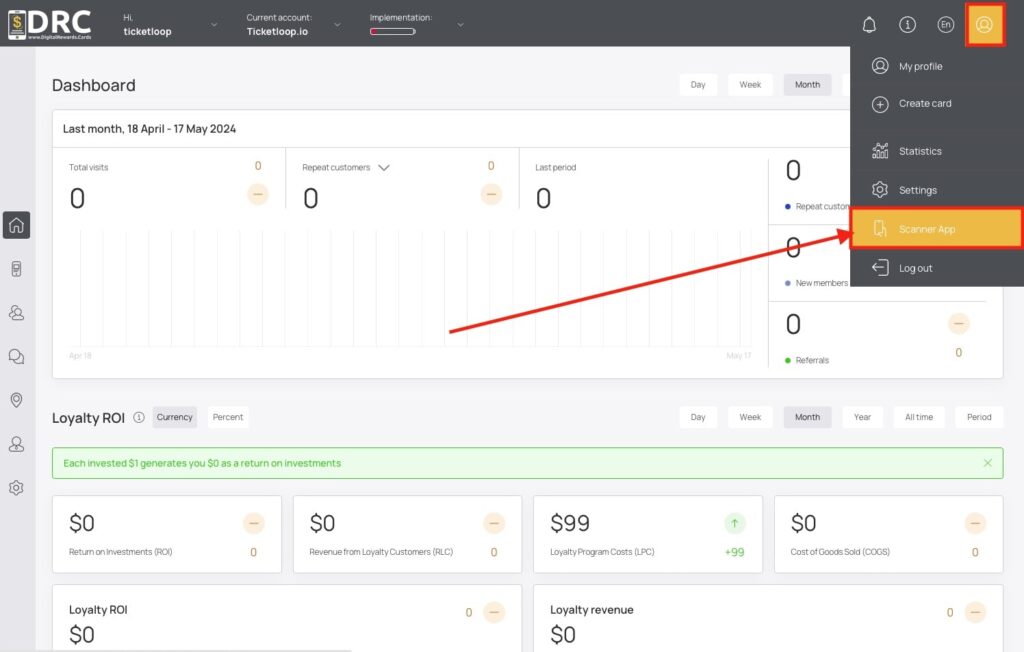
This is a much needed improvement as now you can have the scanner app open in your POS web browser, ask the customer for the last 4 digits of the phone number, confirm their name, then apply points. This eliminates the need for the customer to pull out their phone, open their wallet app, and select their card.
If you’re already subscribed to Digital Rewards Cards (DRC), you can try it out now!
Key Highlights
- The new scanner app update simplifies customer look-up by allowing users to search for customers by name, phone number, and email address.
- The update also includes a streamlined check-out process.
- The scanner app provides features such as rewards redemption, awarding points, personalized experiences, and real-time data insights.
- Using a digital membership card app can improve the member experience, increase customer engagement and retention, streamline business operations, and provide marketing opportunities.
What’s New in the Latest Update
The latest scanner app update introduces several new features and enhancements that take customer look-up to the next level. Here are some of the key additions in the update:
- Personalized experience: The update enables businesses to provide personalized offers and discounts to customers based on their purchase history and preferences. This helps businesses create a more tailored and engaging customer experience.
- Apple Wallet and Google Wallet integration: Customers can easily store and access their membership cards, loyalty points, push notifications and exclusive offers on their mobile devices.
- Streamlined check-out process: The update simplifies the check-out process by enabling businesses to quickly retrieve customer information and process transactions. This reduces wait times at the point of sale and improves overall efficiency.
These new features and enhancements make the scanner app even more powerful and user-friendly. Businesses can now provide a more personalized and convenient customer experience while streamlining their operations.
How the Update Simplifies Customer Look-Up
The latest update of the scanner app simplifies the customer look-up process by introducing new features and improvements that enhance efficiency and convenience. With the ability to search customers by name, phone numbers, and email address, businesses can quickly access customer information and provide personalized service. The integration with Apple Wallet and Google Wallet allows customers to store their membership cards digitally, eliminating the need for physical cards. These enhancements streamline the customer look-up process, saving time and effort for both businesses and customers.
Searching Customers by Name
The update of the scanner app introduces a new feature that enables businesses to search for customers by name. This feature is especially useful for businesses with a large customer base, making it easier to locate and access customer information. By simply entering the customer’s name into the search bar, businesses can quickly retrieve contact information, purchase history, and other relevant details. This streamlined search functionality improves customer service by providing businesses with instant access to customer information, allowing for personalized interactions and efficient problem-solving. Searching customers by name is a valuable tool for businesses looking to enhance their customer management processes and provide exceptional customer experiences.
Looking Up with Phone Numbers
The scanner app update also introduces a convenient way to look up customers using their phone numbers or even by the last 4 digits of their phone numbers. By entering the customer’s phone number into the app, businesses can easily retrieve customer profiles, purchase history, and loyalty program information. This streamlined look-up process saves time and effort for businesses by eliminating the need to manually search through records or contact databases. With the ability to look up customers using phone numbers, businesses can provide efficient and personalized service, enhancing the overall customer experience.
Email Address as a Lookup Option
In addition to searching customers by name and phone numbers, the latest update of the scanner app offers the option to look up customers using their email address. This feature is particularly beneficial for businesses that collect email addresses as part of their customer registration or loyalty program. By entering the customer’s email address into the app, businesses can instantly access customer profiles, purchase history, and membership card information. This efficient look-up option eliminates the need for manual searches or cross-referencing multiple systems. With email address as a lookup option, businesses can provide personalized service to their customers, ensuring a seamless and efficient experience.
Streamlining the Check-Out Process
The enhanced look-up features of the scanner app streamline the check-out process, saving time for both businesses and customers. With quick access to customer information, including purchase history and loyalty program details, businesses can expedite the check-out process by offering personalized service and targeted promotions. This eliminates the need for manual searches or lengthy customer interactions, allowing for a seamless and efficient check-out experience. By reducing wait times and improving efficiency, businesses can enhance customer satisfaction and loyalty. The streamlined check-out process also benefits businesses by increasing sales and improving overall operational efficiency. With the enhanced look-up features of the scanner app, businesses can transform the check-out process into a hassle-free and enjoyable experience for both customers and staff.
Improving Customer Experience
The enhanced look-up features of the scanner app greatly contribute to improving the customer experience. By providing quick access to customer profiles, businesses can offer personalized service and tailored recommendations based on individual preferences and purchase history. This level of personalization enhances the customer experience by making customers feel valued and understood. Additionally, businesses can use the scanner app to send exclusive offers and promotions directly to customers, further enhancing their experience and fostering loyalty. The ability to provide a personalized and seamless experience is a key factor in attracting and retaining customers. With the enhanced look-up features of the scanner app, businesses can create unforgettable customer experiences that drive satisfaction, loyalty, and repeat business.
Reducing Wait Times at POS
One of the significant benefits of the enhanced look-up features of the scanner app is the reduction of wait times at the point of sale (POS). By quickly accessing customer information, businesses can expedite the check-out process and reduce the time customers spend waiting in line. This improved efficiency not only enhances the overall customer experience but also increases customer satisfaction and loyalty. With reduced wait times, businesses can serve more customers in less time, leading to improved operational efficiency and increased sales. The scanner app’s enhanced look-up features provide businesses with the tools to streamline the check-out process, minimize wait times at the POS, and create a more efficient and satisfying shopping experience for both customers and employees.
Conclusion
The new Scanner App Update revolutionizes customer look-up with enhanced features for streamlined operations and improved customer experience. Seamlessly search customers by name, phone numbers, or email addresses, simplifying check-outs and reducing wait times at POS. This update is a game-changer in optimizing efficiency and enhancing customer service. No action is needed on your part. Just open the scanner app on your mobile device, desktop computer, tablet, or POS browser.